
-


-
Products
Information
Free PLR Articles
Your address is safe with us.
Category Archives: AdSense News
Understanding your eCPM (effective cost per 1000 impressions) 1/2
“What is eCPM? What affects my eCPM? What can I do to earn a higher eCPM?”
Effective cost per thousand impressions (eCPM) is the amount of revenue you can expect to earn from AdSense for every 1000 impressions shown on your site. Since eCPM helps you measure how well your ads are performing, we often hear questions from publishers about the factors that impact this metric and how it relates to their earnings. If you’re using the new interface, you’ll see that your reports show RPM (revenue per thousand impressions); RPM is just another term for eCPM, and it’s calculated the same way, so we use these two terms interchangeably.
To help provide some clarity, we’re kicking off a two-part video series with more insights into how eCPM is calculated in order to help you maximize earnings. With the help of AdSense optimization specialist, Matthew Carpenter Arevalo, we’ll show you the factors that affect eCPM, how to track user behavior and traffic patterns, and what you can do to improve your website performance.
If you’d like to learn more about eCPMs visit our Help Center.
Stay tuned for Part 2 to learn what you can do to better understand and optimize your website’s eCPM.
Posted by Meredith Blackwell – Inside AdSense team
Original Thread: Inside AdSense Blog
Understanding your eCPM (effective cost per 1000 impressions) 2/2
Two weeks ago, we shared a brief introduction to the basics of eCPM (aka, RPM), including how it’s calculated and what factors impact it. In the Part 1 video, AdSense optimization specialist Matthew Carpenter-Arevalo discusses key variables you can use to better understand eCPM performance, including CTR (clickthrough rate) and CPC (cost per click).
Today, we’ll go a couple steps further and discuss how user behavior impacts eCPM and show you tools that can help you better understand your users’ traffic patterns.
User behavior refers to how users interact with your site. Generally, there are two types of users:
- Return users who continually come back to your site and spend more time engaging with your content
- Unique users who are arriving at your site for the first time in search of specific information that your site may or may not have
It’s important to understand the make-up of your audience, because different types of users will interact in different ways with your website.
To track and analyze user behavior to help you make informed decisions about your site, we recommend integrating Google Analytics with your AdSense account, so you can see data at more specific levels and by regions. We also suggest setting up channels to understand how the ads across specific pages on your site are performing.
Thanks for following our two-part ‘Understanding your eCPM’ series. We hope you found the content useful, and that you now have a better understanding of the factors that influence your eCPM.
Posted by Meredith Blackwell – Inside AdSense team
Originial post: Inside AdSense Blog
Understanding your reports on Google-certified ad networks
Since launching a new report to show you how much you’re earning from Google-certified third party ad networks, we’ve received questions from publishers around how to make sense of the numbers they’re seeing. Some have let us know that they’re now blocking lower-performing ad networks based on revenue per thousand impressions (RPMs), a practice which can actually have a negative impact on overall revenue. Today, we’d like to take a moment to address your questions and provide more guidance around understanding your reports and blocking specific ad networks.
Let’s first talk about analyzing RPM figures.
View your top channels on the new interface homepage
You’ve been asking, and today we’re excited to announce that you can now view your top 10 performing custom and URL channels directly on the homepage of the new AdSense interface. We understand that many of you log in frequently throughout the day to check in on your stats, and this latest change will allow you to get a quick snapshot directly from the new interface.
When you log in to the new AdSense interface, you’ll see your top channels by estimated earnings along with the percentage change for the selected time period. So if you’ve chosen to view the last 7 days, you’ll see your top performing channels for that time range along with the percentage change they experienced compared to the prior 7 day period.
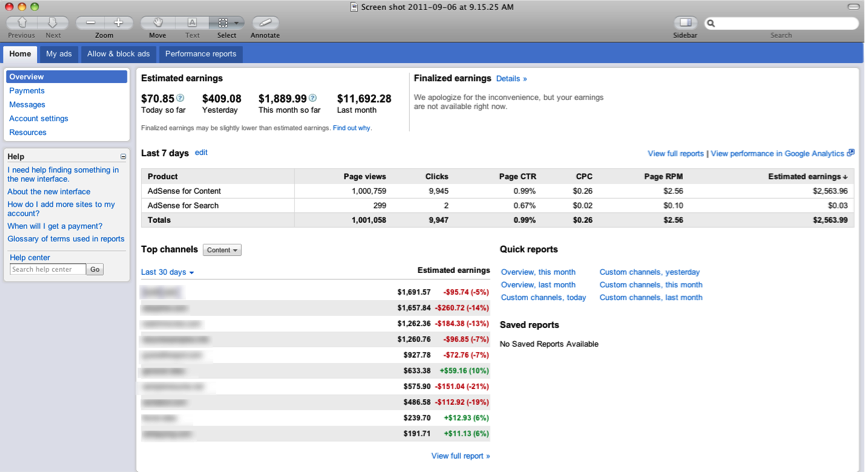
Thanks for all of the feedback you provided about bringing this report to the new interface — you can check out this update by logging in to the new AdSense interface today. As a reminder, we’re gradually moving away from the older version and focusing on building improvements like these in the new interface. We encourage you to continue familiarizing yourself with the new interface, and as always, please feel free to leave us a comment with your thoughts and suggestions.
Posted by Dan Banfield – AdSense Engineering
Source: Inside AdSense Blog
Posted in AdSense News
Leave a comment
Working better together: Protecting against invalid activity
Publishers are the lifeblood of the Internet, and we’re committed to helping you grow your businesses. Last year alone, we shared $6.5 billion with our AdSense publishers.
We also invest immense amounts of time and millions of dollars in systems (including sophisticated algorithms and human reviews) that keep bad ads from appearing on your sites and prevent advertisers from being fraudulently charged for bad clicks.
When everything is working well, advertisers trust our network and continue to invest in it, which generates revenue for you the publisher, ultimately funding the free content users love.
But we’ve also heard the stories: publishers finding their accounts suspended or even disabled for “invalid activity” without a clear understanding of why or how to fix it. We know this can be an intensely frustrating, even scary experience. So why does this happen?
While the vast majority of publishers who sign up for AdSense do so in good faith, unfortunately there are some bad actors out there. As you can imagine, we can’t reveal all the tools we use to keep bad sites and bad traffic out of our network.
But sometimes these tools result in good publishers who become a source of invalid activity having their accounts disabled without much recourse. We’re making some changes we think will help fix this:
- We are considering tenure more actively when responding to detected invalid activity. For example, some trusted publishers will now have their accounts suspended instead of terminated, and over time we hope to work directly with more publishers to resolve invalid traffic issues without needing to disable the account at all. (As always, we’ll continue to credit advertisers for any invalid activity.)
- We’ve given publishers tools to submit more informative appeals via a new form, which may help resolve issues more quickly.
- We’re providing more details on invalid activity’s causes. If we’ve detected a violation of our policies you’ll receive an email and a notification to your account with further information and instructions. And you can read all about the causes of invalid activity at our Ad Traffic Quality Resource Center, which is now available in most languages supported by AdSense, such as German, French, Polish and Arabic.
- Whether you’re looking for a refresher or just creating your first ad unit, you can review the do’s and don’ts of ad traffic in our expanded AdSense Academy.
- In order to help publishers avoid common pitfalls, we’re kicking off a video series that explains why some of our policies exist and how you can make sure you’re working with them. Our first looks specifically at invalid traffic.

We want to work with our publisher partners to keep the AdSense network strong — keeping good publishers’ accounts in good standing, while also protecting advertisers and users from fraudulent activity. This is why we’re making changes, like the ones discussed today, to provide more help when things go wrong. We’ll be making even more changes as the year goes on so look for continued updates on this blog.