
-


-
Products
Information
Free PLR Articles
Your address is safe with us.
Tag Archives: dfp
Hi (matbennett)
(written by matbennett)
Hi All,
I’m a UK based publisher who’s been working with adsense for 10 years now. As well as a number of our own sites, we help with Adsense / DFP / Adx on a few clients sites too.
I’m currently trying to brush up on my personal skills with DFP/Adx and have stopped by here a few times. I thought it was time I joined and said Hi.
Hi, new here
(written by wacnstac)
Hi, I’m new here. I’ve been using AdSense and DFP SB since it was first rolled out as GAM.
The reason why I stumbled on this site was I was looking for the answer that this page talks about:
I have a bunch of CPD campaigns trafficked in at the same “Sponsor” priority all at 100%.
How to create a Basic Cascade with DFP Small Business
Often requested of Google DoubleClick for Publishers (DFB) Small Business (SB) is the ability to create a cascade.
Unfortunately, DFP Small Business does not innately allow you to create a cascade.
DFP Small Business does all the micromanaging for you on determining what ad to show based on the settings you have done.
But it’s still possible to do a cascade by utilizing the way the system works.
How it works
Cascading Line Items is basically having one Line Item deliver until it finishes after which the next Line Item in line starts their run.
You can emulate this by utilizing the 4 things:
- Deliver impressions option “As fast as possible”.
- House priority
- Javascript
- Multiple Ad Units/Ad Placements
The Premise
Please do note that this process is intended for use when there are no other non-cascading Line Items on the Ad Unit/Ad Placement being used.The basis premise of the process is this:
- Having one Line Item “take over” an Ad Unit. You can use either Standard or Sponsorship. I prefer standard as often Cascades are done by “serve X impressions for this Line Item then serve Y impressions for other Line Item” vs being time determined (in which case you really don’t need to do this type of cascade).
- Having one Line Item with a House priority with a Creative that writes out a new Ad Unit.
The Scenario
Overall, that’s how it works. Let’s get to the nitty gritty then, shall we?
For our scenario, we have 4 Tiers that should cascade. They are aptly named:
- Tier One
- Tier Two
- Tier Three
- Tier Four
The Set Up
For a 4 Tiered Cascade, we need 4 Ad Units (and 4 Ad Placements, each Ad Placement will refer to one Ad Unit) and 7 or 8 Line Items.
The Ad Units
Here are the Ad Units I created
- Tier One
- Ad Unit: Cascade_1_300x250
- Ad Placement: Cascade_Tier_1
- Tier Two
- Ad Unit: Cascade_2_300x250
- Ad Placement: Cascade_Tier_2
- Tier Three
- Ad Unit: Cascade_3_300x250
- Ad Placement: Cascade_Tier_3
- Tier Four
- Ad Unit: Cascade_4_300x250
- Ad Placement: Cascade_Tier_4
The Line Items
Here is the first Tier of Line Items I created with the basic settings.
- Tier One
- Cascade Tier One Ad
Type: Standard High
Start Date: Immediately (or whenever you want it to start)
End Date: Unlimited
Quantity: 100
Deliver Impressions: As fast as possible
Target Inventory: Cascade_Tier_1 - Cascade Tier One Waterfall
Type: House
Start Date: Immediately (or whenever you want it to start)
End Date: Unlimited (important to set unlimited!)
Goal: 100%
Target Inventory: Cascade_Tier_1
- Cascade Tier One Ad
That’s how I have set up the Line Items for Tier One.
Tier 2, 3 and 4 follow the same exact settings. For the Line Item “Cascade Tier One Ad”, you would put your normal Creative here.
This is the ad you want to see in the first cascade. For the Line Item “Cascade Tier One
Waterfall”, instead of putting a Creative in there, you would put this:
<script type="text/javascript">
document.write('<scr'+'ipt type="text/javascript">');
document.write('GA_googleFillSlot("Cascade_2_300x250");');
document.write('<\/scr'+'ipt>');
</script>
The above code uses Javascript to print out the DFP code for the next Ad Unit:
Cascade_2_300x250.
Tagged ads, adsense, dfp, server, small business, tips, tutorial
Leave a comment
How to make AdSense compete with your other Ad inventory in DFP Small Business
I assume that if you are reading this chapter you are not only serving AdSense via DFP but instead have other Advertising campaigns that you run.
So how can you maximize the revenue of your Ad Inventory using the build in DFP AdSense feature? Easy, make AdSense compete with your other inventory.
This means that you can set up DFP so that it will only show AdSense if the AdSense Ad showing actually has a higher CPM then your other Ads in competition for a specific Ad Unit.
To do that you first need to set up the build in AdSense feature for your DFP Ad Units: How to set up Google AdSense using DFP Small Business build in AdSense option
If you previously used my initial approach and created a separate line item for each AdSense Ad Unit you unfortunately have to disable them all and set up your DFP Ad Units for using AdSense like I described in the link above.
Now you need to know that only Line Items of the following Type can compete with AdSense:
- network
- bulk
- price priority
- house
You can set the Type of a Line Item here:
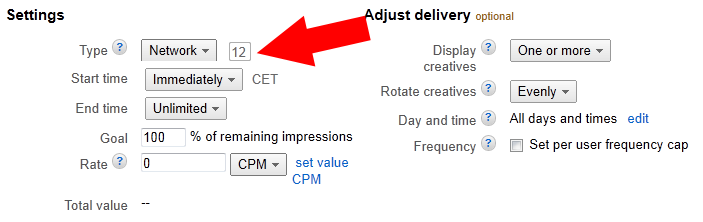
You’ll find an explanation of the different priority types here: DFP Small Business Line Item Settings Explained
So if you want your Third Party Ad Inventory to compete with AdSense you need to make sure that the Line Items serving your Third Party Ads are set to one of the above Types.
Now you just need to set a CPM price for your Line Items and as soon as you did that, AdSense will compete with your Third Party Ad Inventory and will only show if the CPM price the AdSense Ad gets is higher then your defined CPM price.
You can set the CPM price by clicking on a Line Item you want to compete with AdSense then click on the Settings Tab and enter the CPM price into the Rate field.
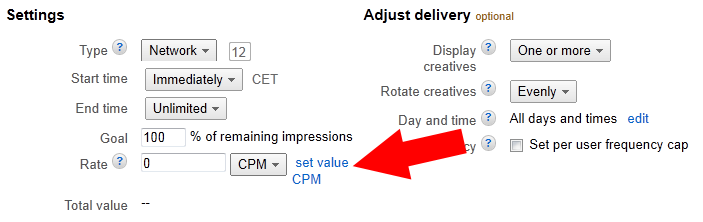
Click save and you are done.
I have read some posts on webmaster forums where people thought they could use this system to ‘trick’ AdSense to serve higher paying Ads on their websites.
CAREFUL: If your goal is to only get Ads that have an equal or higher CPM you defined and if not don’t get an Ad at all then you can use the above method.
But if you think that you can ‘trick’ AdSense into serving only higher paying Ads to circumvent your Smart Pricing Factor you are mistaken.
If you use the method above and don’t have Third Party Ads competing with AdSense you will get a lot less Ad Impressions from AdSense (depending on the CPM you set).
Each Ad Impression that is not delivered, even if it only pays cents, is revenue lost. Keep that in mind.
Tagged ads, adsense, dfp, server, small business, tips, tutorial
3 Comments
How to optimize AdSense with Split Tests
Hello
I always say that continuously testing is the key to maximizing AdSense earnings.
Today I want to emphasize this once more with an example from my recent tests.
The last 2 month my AdSense earnings dropped about 1/3 for no apparent reason.
The traffic is nearly the same and I run forum(s) so there is fresh content daily.
I’d like to think that April and Mai are month with low advertising spendings (in direct sold advertising it is) but anyways AdSense is a long term business and a few draw backs are not unusual.
I took this “opportunity” and started testing again to see if I can get the numbers back up by running a few Split Tests.
But what is a split test?