
-


-
Products
Information
Free PLR Articles
Your address is safe with us.
Tag Archives: dfp
Introducing the next generation of the DFP ad tag
For websites that sell display advertising, the ad tag is the essential link between a publisher’s ad server, such as DoubleClick for Publishers (DFP), and website content. An ad tag is a snippet of code that is inserted into the source code of a web page in order to display ads.
Properly implementing your ad tags is a vital piece of your ad operations since it directly affects your visitor’s experience to your website and bottom-line. Tagging errors can prevent the correct ad from being displayed, or prevent ads from displaying altogether. Slow loading ads can also slow down the loading of content, resulting in long wait times for your site’s visitors.
This is why we’re so excited to introduce the next generation of the DFP ad tag: The Google Publisher Tag. The new tag provides publishers with several key benefits including:
Introduction into DFP Small Business
First you need to register with DFP Small Business.
You need a Google AdSense Account to use DFP Small Business.
DFP is some sort ‘Layer’ on top of Google AdSense because whenever you don’t have Third Party Ad Inventory to serve you can use the build in AdSense Option as fall back and even make AdSense compete with your inventory.
Register an AdSense Account if you don’t have one now or if you have one already it is as simple as logging in to DFP Small Business and linking your Google Account to DFP.
Side note: As AdSense Publisher you might want to check out my AdsenseExperts-Area.
After you have logged in to DFP Small Business you see three Tabs:
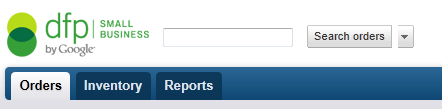
- Orders
- Inventory
- Reports
Orders
In the orders tab there are two major categories: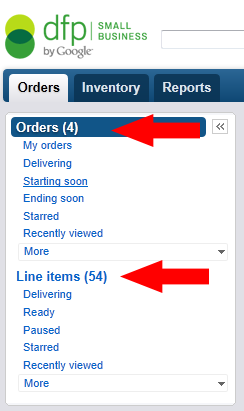
- Orders
- Line Items
Orders are the Advertisers that buy/bought Advertising on your site.
For each new customer you can create a separate Order including contact details for the specific Advertiser.
Each Order/Customer can contain as many Line Items as you like.
Line Items are the campaigns the Advertiser wants to run on your site.
Each Line Item/Campaign can contain as many Creatives (Ads/Banners) as you like. Bare with me, I’ll explain everything later with an example.
But before we can add Customers and Campaigns we have to add our Ad Inventory to DFP Small Business. So go to the Tab Inventory in the main navigation.
Inventory
In the Inventory Tab you have two options: 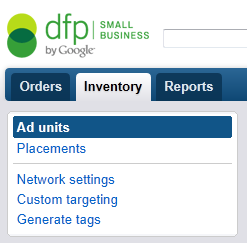
- Ad Units
- Placements
Ad Units are the actual Ad Units on your website. For example the leaderboard below your header or the large rectangle within your articles.
Placements are your booking options for your Ad Units. You can select a single Ad Unit as Placement or you can combine as many Ad Units as you like into one Placement.
This is useful if you want to offer your Advertisers different options like a Run of site campaign that includes all your Ad Units or a more grained down approach with the Advertiser only targeting one individual Ad Unit of your site.Another example would be to combine all ‘Above The Fold’ Ad Units into one Placement.
You don’t need to set up Placements in order to run Ad Campaigns on your site but the more complex your Ad Inventory becomes the more useful Placements will be.
Also you can make Placements available to AdWords Advertisers and offer them on your DoubleClick Ad Planner for sale. Both make your websites Ad inventory more visible to possible new Advertisers for placement targeting.
Reports
I’ll think you’ll figure out the reports tab options on your own.
Tagged ads, adsense, dfp, server, small business, tips, tutorial
5 Comments
Loading more adslots after scroll
(written by Olive Net)
I’ve been setting up responsive DFP ads that reload on a screen resize event. This uses the command
googletag.pubads().refresh();
It struck me that this might also be used after a scroll event to effectively have more than the regulation 3 adslots on a long page (assuming all DFP adslots are Adsense enabled and following Adsense rules).
May I have 4 AdSense blocks using Google DFP?
(written by ADHONYS)
Hello, i was looking at this site: Duravit: Colección vintage para el baño – Hogar Total and it shows 4 blocks of adsense. Can they do that?
I guess they have Dfp or Adsense premium.> Somebody will try to tell me
Myth? DFP Adsense increases once you delive a 10% higher house ad
(written by unicorn)
Your Rectangle has a regular cpm of 10 $.
You deliver the banner from dfp-activate-adsense (inhouse).
-> You get a cpm of 10$
Now, the myth:
Your Rectangle has a regular cpm of 10 $.
You deliver the banner from dfp-activate-adsense (inhouse).
You create any house campagin (the ones that compete with inhouse adsense) of 11$
-> You get an adsense cpm of 11$
So, the myth has to be right as adsense competes with house campaigns. The question remains, if adsense delivers most of its banners (90%+ delivery of adsense, 10%- of house campaign).