
Hello
This is another AdSense implementation for your vBulletin 4.0 Forum.
This placement is exclusively released for AdsenseExperts.
You are allowed to use this placement on your own forum, however republishing this modification on other website is only allowed with prior written consent by me.
What this mod does
This mod adds a Google Adsense large rectangle inside the last post of each thread.
It is blended to complement your forum content but is clearly labeled as Ad to strictly separate Ads from content.
This approach is taken for the reasons discussed here:
Is too much blending bad for business?
Make sure you use the same colors as you use on your forum to optimize blending!
Note
This mod shows the AD only to GUESTS!
If you want to show it to your members as well remove the
$show['guest']
part of the condition!
Installation instructions
In the template additional.css add:
/*------------------------------------------------------------------------------
| #> Advertising Optimized by AdsenseExperts
+-----------------------------------------------------------------------------*/
/* Ad inside first and/or last post */
.ad_text {
  font-weight: normal;
  margin-bottom: 0px !important;
}

.AdCommercial {
  float: right;
  clear: right;
  overflow:hidden;
  background-color:#FAFAFA;
  text-align: right;
  font-size:10px;
  width:336px;
  margin-left:5px;
}

.ads_hr_style {
  background-color: #FAFAFA;
  color: #FAFAFA;
  border: 1px dotted #D8D8D8;
  border-style: none none dotted;
  display: block !important;
}

.AdCenter {
  align:center;
  margin:0;
  padding-bottom: 5px;
}

.bbcode_container div.bbcode_quote {
  overflow: auto;
}
then open the template postbit_legacy and find:
{vb:raw post.message}
and replace it with:
<vb:if condition="$show['guest'] AND !$thread[replycount] == 0 AND !$post['isfirstshown'] AND $post['islastshown']">
  <div class="ad_content_wrapper">
    <div class="AdCommercial">
      <hr class="ads_hr_style" />
      <p class="ad_text">ADVERTISING</p>
      <div class="AdCenter">
        YOUR ADSENSE LARGE RECTANGLE CODE HERE
      </div>
      <hr class="ads_hr_style" />
    </div>
    {vb:raw post.message}
  </div>
<vb:else />
  {vb:raw post.message}
</vb:if>
Notes
Make sure to check and adapt especially domain to fit your forum.
If you are also want to use my AdSense inside the first post – AdsenseExperts Exclusive implementation then you need to use this code instead of the above (css remains the same):
<vb:if condition="$show['guest'] AND $post['isfirstshown']">
  <div class="ad_content_wrapper">
    <div class="AdCommercial">
      <hr class="ads_hr_style" />
      <p class="ad_text">ADVERTISING</p>
      <div class="AdCenter">
         YOUR ADSENSE RECTANGLE CODE HERE
      </div>
      <hr class="ads_hr_style" />
     </div>
    {vb:raw post.message}
  </div>
<vb:elseif condition="$show['guest'] AND !$thread[replycount] == 0 AND !$post['isfirstshown'] AND $post['islastshown']" />
  <div class="ad_content_wrapper">
    <div class="AdCommercial">
      <hr class="ads_hr_style" />
      <p class="ad_text">ADVERTISING</p>
      <div class="AdCenter">
        YOUR ADSENSE RECTANGLE CODE HERE
      </div>
      <hr class="ads_hr_style" />
    </div>
    {vb:raw post.message}
  </div>
<vb:else />
  {vb:raw post.message}
</vb:if>
Screenshot
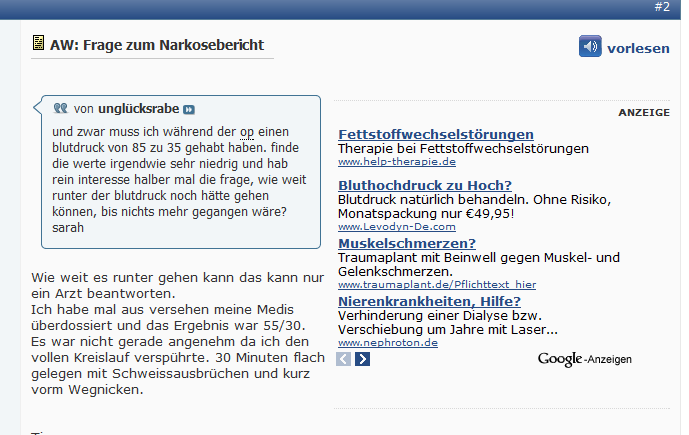
Versions
- v1.5: Changed the BBCode behaviour again to better handle nested code.
- v1.4: New approach to Quote handling and optimized DIV usage. Upgrade is highly recommended.
- v1.3: Removed the float_spacer to resolve a rendering conflict with IE6 + 7. The Ad was displayed over the posting text. You should upgrade to the newest version.
- v1.2: I changed the code to show the Ad on the right side. The left side creates various problems when quotes are present due to user info being float:left
- v1.1: introduction of the float_spacer
- v1.0: initial release
Of course feedback is welcome and if you have suggestions to further improve CTR please let me know!
Kind regards
admin


But from a 4 days comparison eCPM went up 125% and eCPM went up 160% for this placement.
So if you use version 1.0 I'd suggest you upgrade to version 1.1
vb:raw ad_location.thread_last_post_content
code in postbit_legacy. Using 3.8.6.
Thanks in advance.
But on my sites it looks like it should with IE 8.
AdSense Integration as last post
Please help. Thank you.
Every webmaster should be able to write some basic HTML and CSS.
If you can't find it with FireBug then ask me again, but try to find it yourself first!
So it is really independent of the whatever height i set.
It must be a modification you installed.
Try it on a vBulletin standard style without mods and see if it works.
If so it's one of your other mods that is interfering.
The results were same i.e. displaying after the postbit info.
If that still does not work send me your url with the implementation.
Also how does welcome ad modification performs versus this one?
Would you be kind enough to share your revenue in percentage vice as compared to the other two mods?
Welcome ad performs second in revenue and first in CTR (because it uses Large Rectangles) Last post ad performs last in revenue and CTR.
Is there a way to place the ad in the middle post or top 25%.
That's as always here a nice thread! I'm pretty new in the adsense/seo world, I hope to contribute soon! :) But I have a naïve question! * Really* :)
On vBulletin 4.1.2 there is an Ads manager. You can place the ads where you want.
And you can place them at the first and at the last post of a thread?
What's the difference with yours? Except the css ;)
Regards
check out "Werbung" --> "Werbung hinzufügen".
I use DFP as Ad Server
I have use it for a banner at the top of my website without a problem.
You could also use it for last and first post placements.
The only thing is you can only post html in it, so you can configure your css after, but you cannot put vb conditional.
So for my welcome message I have directly edited the template.
But for 'basic' features, it does the job on vB 4.1.2
I am a person that likes control so I prefer editing the HTML myself but for most people the Ad Manager will for sure be a real help.
TO display adsense inside the last post of every page please use:
- MR = Medium Rectangle
- LR = Large Rectangle
I test every location, I even try out new locations once in a whileThe version number was updated to 1.2
this is the image of 1st post ad:
(Image no longer exists)
and this is the image of the last post ad
(Image no longer exists)
i have copied the code exactly as you wrote it, could you please help me to solve this?
This means the problem is solved but the Ad wont be fully surrounded by Text anymore.
Anyways you should upgrade to the newest version
Now the quote box is set with a fixed width when an Ad is present (in my code above 300px) which keeps the text next to the Ad but prevents the quote box to overlap the Ad.
I also highly optimized the DIV usage and made the dotted background image obsolete
Enjoy :)
(Resource no longer exists)
Although it seems the first post ad shrinks any images so they can fit but the last post just knocks the image down to make space. Either way as long as nothing is over lapping I think this is the best solution
Enjoy :)
If anyone has one, I am all ears :)
Is this correct or should it be add below? The reason I ask is when I do this the text from the posts don't appear to logged in members. Also when I choose the insert below version, the first post repeats itself twice?
Bound to be something I've done wrong but I wanted to check before I revert back to my version that seemed to work ok?
Thanks
The error was in the combined solution.
It's fixed now ;)
Thanks for pointing it out
Check link
How to increase page rank? - Page 2
Is there a solution?
It worked a few weeks, but yesterday i checked the adsense placement an i see that problem with the placement in the last post. I´m sure its only a little thing, but i cant find it. Have you an idea?
regards luka