
AdSense inside the last post – AdsenseExperts Exclusive

Hello

This is another AdSense implementation for your vBulletin 4.0 Forum.

This placement is exclusively released for AdsenseExperts.

You are allowed to use this placement on your own forum, however republishing this modification on other website is only allowed with prior written consent by me.

What this mod does

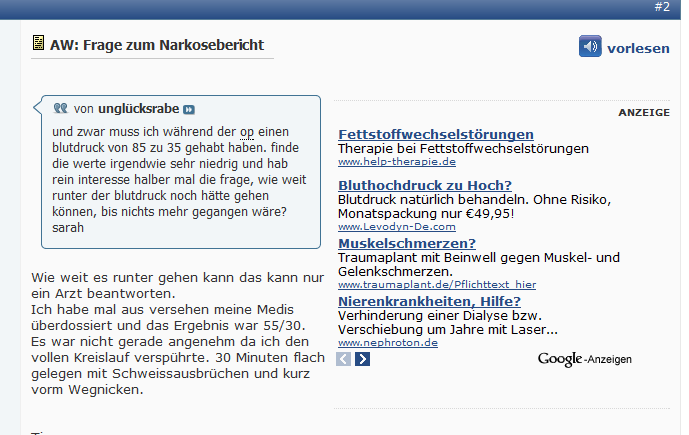
This mod adds a Google Adsense large rectangle inside the last post of each thread.

It is blended to complement your forum content but is clearly labeled as Ad to strictly separate Ads from content.

This approach is taken for the reasons discussed here:
Is too much blending bad for business?

Make sure you use the same colors as you use on your forum to optimize blending!

Note

This mod shows the AD only to GUESTS!

If you want to show it to your members as well remove the

$show['guest']

part of the condition!

Installation instructions

In the template additional.css add:

/*------------------------------------------------------------------------------
| #> Advertising Optimized by AdsenseExperts
+-----------------------------------------------------------------------------*/
/* Ad inside first and/or last post */
.ad_text {
  font-weight: normal; 
  margin-bottom: 0px !important;
}

.AdCommercial { 
  float: right; 
  clear: right; 
  overflow:hidden; 
  background-color:#FAFAFA; 
  text-align: right; 
  font-size:10px; 
  width:336px; 
  margin-left:5px;
}

.ads_hr_style { 
  background-color: #FAFAFA; 
  color: #FAFAFA; 
  border: 1px dotted #D8D8D8; 
  border-style: none none dotted; 
  display: block !important;
}

.AdCenter { 
  align:center; 
  margin:0; 
  padding-bottom: 5px;
}

.bbcode_container div.bbcode_quote { 
  overflow: auto; 
}

then open the template postbit_legacy and find:

{vb:raw post.message}

and replace it with:

<vb:if condition="$show['guest'] AND !$thread[replycount] == 0 AND !$post['isfirstshown'] AND $post['islastshown']">
  <div class="ad_content_wrapper">
    <div class="AdCommercial">
      <hr class="ads_hr_style" />
      <p class="ad_text">ADVERTISING</p>
      <div class="AdCenter">
        YOUR ADSENSE LARGE RECTANGLE CODE HERE
      </div>
      <hr class="ads_hr_style" />
    </div>
    {vb:raw post.message}
  </div>
<vb:else />
  {vb:raw post.message}
</vb:if>

Notes

Make sure to check and adapt especially domain to fit your forum.

If you are also want to use my AdSense inside the first post – AdsenseExperts Exclusive implementation then you need to use this code instead of the above (css remains the same):

<vb:if condition="$show['guest'] AND $post['isfirstshown']">
  <div class="ad_content_wrapper">
    <div class="AdCommercial">
      <hr class="ads_hr_style" />
      <p class="ad_text">ADVERTISING</p>
      <div class="AdCenter">
         YOUR ADSENSE RECTANGLE CODE HERE
      </div>
      <hr class="ads_hr_style" />
     </div>
    {vb:raw post.message}
  </div>
<vb:elseif condition="$show['guest'] AND !$thread[replycount] == 0 AND !$post['isfirstshown'] AND $post['islastshown']" />
  <div class="ad_content_wrapper">
    <div class="AdCommercial">
      <hr class="ads_hr_style" />
      <p class="ad_text">ADVERTISING</p>
      <div class="AdCenter">
        YOUR ADSENSE RECTANGLE CODE HERE
      </div>
      <hr class="ads_hr_style" />
    </div>
    {vb:raw post.message}
  </div>
<vb:else />
  {vb:raw post.message}
</vb:if>

Screenshot

Versions

  • v1.5: Changed the BBCode behaviour again to better handle nested code.
  • v1.4: New approach to Quote handling and optimized DIV usage. Upgrade is highly recommended.
  • v1.3: Removed the float_spacer to resolve a rendering conflict with IE6 + 7. The Ad was displayed over the posting text. You should upgrade to the newest version.
  • v1.2: I changed the code to show the Ad on the right side. The left side creates various problems when quotes are present due to user info being float:left
  • v1.1: introduction of the float_spacer
  • v1.0: initial release

Of course feedback is welcome and if you have suggestions to further improve CTR please let me know!

Kind regards

admin

This entry was posted in AdSense Placements and tagged , , , , , , . Bookmark the permalink.

65 Responses to AdSense inside the last post – AdsenseExperts Exclusive

  1. admin says:
    *first post reserved*
  2. admin says:
    I don't have a lot of stats to compare the results before and after introducing the float_spacer because I switched from displaying the AD as last post to inside the last post 4 days before introducing the float_spacer to my Mod.

    But from a 4 days comparison eCPM went up 125% and eCPM went up 160% for this placement.

    So if you use version 1.0 I'd suggest you upgrade to version 1.1
    • puertoblack2003 says:
      thanks for sharing.
  3. admin says:
    You are welcome ;)
  4. unicorn says:
    In Windows 7 Internet Explorer 8.0.7600 the rectangle is like a popup to the text. The text is not flowing around, but the rectangle is hiding the text.
    • John M says:
      Hi, trying to implement this mod, but i don't have the

      vb:raw ad_location.thread_last_post_content

      code in postbit_legacy. Using 3.8.6.

      Thanks in advance.
  5. admin says:
    If you provide a link I will have a look.

    But on my sites it looks like it should with IE 8.
  6. unicorn says:
    Did you try this location against this location?

    Userinfo | Last Post Text
    << last | next >>
    (empty) | Large Rectangle (looking like a postbit, with empty left userinfo)
  7. admin says:
    Do you mean this placement?
    AdSense Integration as last post
  8. cheenamalai says:
    My ad displays too much spacing on the top. Which variables control the spacing on the top of the ad? I want the ad to move up a little bit.

    Please help. Thank you.
  9. admin says:
    Get yourself FireBug and try things like this yourself.

    Every webmaster should be able to write some basic HTML and CSS.

    If you can't find it with FireBug then ask me again, but try to find it yourself first!
  10. cheenamalai says:
    Hey its a nice software, but unable to use it. Let me know which variable it is, i have changed 70px to 40px, but there were no changes in the location of the ad. Thanks.
  11. cheenamalai says:
    I have noticed that the ad for this modification starts from where the end of the postbit info, like here you can see "Posts: 6". The ad will start from there on the right side.

    So it is really independent of the whatever height i set.
  12. cheenamalai says:
    Did you have time to take a look at this issue? I mean the ad displays after the postbit info regardless.
  13. admin says:
    I don't have the issue you are describing.

    It must be a modification you installed.

    Try it on a vBulletin standard style without mods and see if it works.

    If so it's one of your other mods that is interfering.
  14. cheenamalai says:
    Just tested this on default template and mods disabled.

    The results were same i.e. displaying after the postbit info.
  15. admin says:
    then redo everything, make sure you put all css into additional.css.

    If that still does not work send me your url with the implementation.
  16. cheenamalai says:
    How does this ad performs versus your first post modification?

    Also how does welcome ad modification performs versus this one?

    Would you be kind enough to share your revenue in percentage vice as compared to the other two mods?
  17. admin says:
    First post ad performs best in revenue, second in CTR.

    Welcome ad performs second in revenue and first in CTR (because it uses Large Rectangles) Last post ad performs last in revenue and CTR.
  18. cheenamalai says:
    Just wondering how much is the significant change between the first post mod and last post mod? because i am making only 30% of the first post mod.
  19. admin says:
    Same for me. The difference is hugh comparing first and last post ad but that is to be expected. The further down a page you place ads the less people see them.
    • cheenamalai says:
      Same for me. The difference is hugh comparing first and last post ad but that is to be expected. The further down a page you place ads the less people see them.
      Do you know why? Even though most people are going to read the whole conversation top to down?

      Is there a way to place the ad in the middle post or top 25%.
  20. admin says:
    Not without programming. vBulletin has no condition for this as far as I know.
    • Laurent says:
      Hello,

      That's as always here a nice thread! I'm pretty new in the adsense/seo world, I hope to contribute soon! :) But I have a naïve question! * Really* :)

      On vBulletin 4.1.2 there is an Ads manager. You can place the ads where you want.

      And you can place them at the first and at the last post of a thread?

      What's the difference with yours? Except the css ;)

      Regards
      • ravel says:
        check out the screenshots. admins Adsense integration is a WAY better than the standard adsense integration. the text floats around the advertisement which gives a better click rate.
  21. admin says:
    Never tried it. The German Versions doesn't come with the Ad manager :)
    • ravel says:
      Of course there is an ad manager in the german version.

      check out "Werbung" --> "Werbung hinzufügen".
  22. admin says:
    Still did not try it and why should I, my Ads are fine the way they are. I don't see any advantage in using the build in ad manager.

    I use DFP as Ad Server
  23. Laurent says:
    I find the ads manager pretty cool and easy to use.

    I have use it for a banner at the top of my website without a problem.

    You could also use it for last and first post placements.

    The only thing is you can only post html in it, so you can configure your css after, but you cannot put vb conditional.

    So for my welcome message I have directly edited the template.

    But for 'basic' features, it does the job on vB 4.1.2
  24. admin says:
    Great to hear.

    I am a person that likes control so I prefer editing the HTML myself but for most people the Ad Manager will for sure be a real help.
  25. anilrgowda says:
    will try this and will update
  26. matthevv says:
    VBULLETIN 3.X REFERENCE!

    TO display adsense inside the last post of every page please use:

    <if condition="is_member_of($bbuserinfo, 1)">
    <if condition="$post['islastshown']">
    <br />lastpost adsense
    </if></if>
  27. TheChiro says:
    How's this working out for you? Do you still have a consistent higher CTR? Do you use this and the one for the first post? Which makes more if you do? And have you tried this with a MR? I need to do more split testing but for the one in the first post, I had a lesser CTR but the CPC was so much higher. Might have been a fluke, so I'm going to continue to split test for another week or so.
  28. admin says:
    Congratulations, good to see that it works for others too :)
    • MR = Medium Rectangle
    • LR = Large Rectangle
    I test every location, I even try out new locations once in a while
  29. matthevv says:
    Great! i use MR because I find them to have higher ecpm
  30. admin says:
    Due to several issues with displaying the Ad on the left when a quote is present I changed the code to display Ads on the right side of the last post.

    The version number was updated to 1.2
  31. cloferba says:
    I have problems to display the add, basically because it is shown behind texts and images, i dont know why

    this is the image of 1st post ad:
    (Image no longer exists)

    and this is the image of the last post ad
    (Image no longer exists)

    i have copied the code exactly as you wrote it, could you please help me to solve this?
  32. cloferba says:
    i confirm that with IE7 and IE8 the ads are behind the text and images. Be careful because it is against adsense TOS
  33. admin says:
    To fix this issue I had to remove the float_spacer unfortunately.

    This means the problem is solved but the Ad wont be fully surrounded by Text anymore.

    Anyways you should upgrade to the newest version
  34. cloferba says:
    thanks, i will upgrade and see :)
  35. admin says:
    Ah and one more downside. In IE7 the Text of the post will be pushed below the Ad
  36. cloferba says:
    i dont know if its possible to make a conditional on vbulletin, if it is IE, dont show the text, else...yes
  37. synseal says:
    Has anyone had issues with when looking at the last post if it has a quote from another post, the quote wrapper is below the advert along with the reply rather than inline, apart from this I love it!.
  38. admin says:
    There is no solution for displaying the quote next to the Ad without major changes to the layout structure of the postbit
  39. khris-bean-seo says:
    this is really good and should boost your adsense earnings
  40. admin says:
    In my newest version 1.4 I changed the handling of quotes present. The old approach pushed the quote below the Ad which left an empty space left to the Ad.

    Now the quote box is set with a fixed width when an Ad is present (in my code above 300px) which keeps the text next to the Ad but prevents the quote box to overlap the Ad.

    I also highly optimized the DIV usage and made the dotted background image obsolete

    Enjoy :)
  41. Toon says:
    I've reverted back to the original codes in the original posts and I'm happy with how they are...

    (Resource no longer exists)

    Although it seems the first post ad shrinks any images so they can fit but the last post just knocks the image down to make space. Either way as long as nothing is over lapping I think this is the best solution
  42. admin says:
    I updated the Code to Version v1.5

    Enjoy :)
  43. Toon says:
    did you realize your ads are appearing for users that are logged in now also? or is that intentional?
  44. admin says:
    This is intentional. The Ad was booked for members not for guests :)
  45. cheenamalai says:
    What about v1.1 for this? No text file here.
  46. admin says:
    the older versions are flawed and are violating AdSense TOS due to quotes overlapping AdSense Ads
  47. cheenamalai says:
    Really need the float_spacer back, if there is an "option" to add it to the current mod.
  48. admin says:
    I tried everything. Did not find a solution.

    If anyone has one, I am all ears :)
  49. Toon says:
    Trying to update this to the most recent version with my template updates, I noticed in the first post it says:

    and replace it with:

    Is this correct or should it be add below? The reason I ask is when I do this the text from the posts don't appear to logged in members. Also when I choose the insert below version, the first post repeats itself twice?

    Bound to be something I've done wrong but I wanted to check before I revert back to my version that seemed to work ok?

    Thanks
  50. admin says:
    It's replace. And it should show to members too but there was an error, you are right.

    The error was in the combined solution.

    It's fixed now ;)

    Thanks for pointing it out
  51. Toon says:
    NO worries, as a temp mesure I used the VB built in first post and last post, is there a reason why your's is slightly improved over the built in version?
  52. admin says:
    I actually never tried it but as far as I know the build in version has the text in a column next to it and in mine the text flows around the ad
  53. Toon says:
    Ah, you're correct I see that now. Thanks
  54. datoneer says:
    Please help me my quote in last post is going over ad. How to fix this to look like on first post

    Check link

    How to increase page rank? - Page 2
  55. datoneer says:
    Ok i fixed this. Now it is right next to the ad. How can i do this to be like on first post
  56. datoneer says:
    I can see adsense ad only if i'm using vertical template...How's that??

    Is there a solution?
  57. admin says:
    Try the combined solution of this ad placement: AdSense inside the first post - AdsenseExperts Exclusive
  58. luka says:
    I have a little Problem: In the first post the adsense placement displays correctly. But in the last post i only see the upper and the lower dotted lines and the word ADVERTISING. I checked the code several times, but i cant find the mistake.

    It worked a few weeks, but yesterday i checked the adsense placement an i see that problem with the placement in the last post. I´m sure its only a little thing, but i cant find it. Have you an idea?

    regards luka
  59. luka says:
    OK, i almost found the problem. Must be something with the TMS. I will make the changes tomorrow for each style.

Leave a Reply to datoneer Cancel reply

Your email address will not be published. Required fields are marked *

*